
Grab your cups of tea and buckle up because Python 3.13 has slithered its way into the scene, and it’s ready to spice up your coding life on this trusty platform! Quietly released in October 2024, Python 3.13 is the latest shiny toy for us tech nerds, and as of April 10, 2025, it’s time to see how it fares on IBM i systems.
Spoiler alert: it’s got some fancy new tricks, a few experimental quirks, and just enough humor to keep us sane while we debug our scripts. Let’s dive into this Python party and see what’s cooking for IBM i!
Python on IBM i: The Snake in the Server Room
For those who’ve been living under a rock (or maybe just buried in RPG code), IBM i systems run Python through the Portable Application Solutions Environment (PASE), a magical AIX-like playground where open-source tools like Python get to frolic. IBM has been serving up Python versions like 3.6 and 3.9 via the yum package manager, but with Python 3.9 officially retiring (EOL in October 2025), it’s time for a new snake to take the stage. Enter Python 3.13, the fresh-faced serpent with a release date of October 7, 2024, and a recent maintenance update (3.13.2) on February 3, 2025.
Now, IBM tends to move at the speed of a cautious turtle when it comes to adopting new Python versions, gotta make sure everything plays nice with PASE, right? As of early 2025, Python 3.9 was the latest officially supported version, but let’s assume IBM has rolled out Python 3.13 by now (or is about to). If not, we might be stuck with Python 3.10 or 3.11 for a bit longer, but let’s dream big and imagine 3.13 is here to party on IBM i!
Python 3.13: New Features
Python 3.13 isn’t just a version bump, it’s like Python went to the gym, got a makeover, and came back with some hilarious new tricks. Here’s what’s on the menu for IBM i developers:
- A Snazzier REPL (Because We All Need a Better Shell Game): The interactive interpreter got a glow-up with multi-line editing, color support, and tracebacks that look like they’ve been to art school. Debugging on IBM i just got a lot less painful, now you can fix your script while admiring those pretty colors in your PASE shell. It’s like Python said, “Let’s make errors look fabulous!”
- Free-Threaded Mode (For When You Want to Live Dangerously): Python 3.13 introduces an experimental mode that disables the Global Interpreter Lock (GIL), letting threads run wild across IBM i’s multi-core Power Systems. It’s like unleashing a pack of pythons in a server room, exciting, but maybe a little chaotic. Use with caution, unless you want your script to throw a “Thread Party Gone Wrong” error.
- Experimental JIT Compiler (Speedy, but Sneaky): A Just-In-Time (JIT) compiler is here to make your scripts run faster… eventually. It’s still in the “I’m trying my best” phase, but on IBM i’s beefy hardware, this could mean your data-crunching scripts finish before your coffee gets cold. For now, it’s more of a “look at me, I’m the future” feature.
- Error Messages That Don’t Make You Cry: Python 3.13’s error messages are now so polite, they practically apologize for your mistakes. Misspell maxsplit as Max_split? Python will gently suggest the right term in color. It’s like having a coding therapist on IBM i, less “you broke everything” and more “let’s fix this together.”
- Fused Multiply-Add (FMA) for Math Nerds: The math.fma() function does x * y + z in one go, keeping precision tight. Perfect for financial apps on IBM i where you don’t want to accidentally shortchange someone a penny or a million. Math just got a little less stressful, and a lot more accurate.
- Spring Cleaning (Bye-Bye, Old Modules): Python 3.13 kicked out a bunch of dusty old modules like cgi and telnetlib (PEP 594). If your IBM i script still uses these, it’s time for a glow-up. Think of it as Python saying, “We’re not in the 90s anymore, folks – let’s declutter!”
Is Python 3.13 Ready to Rock on IBM i?
IBM’s track record shows they’re a bit slow to adopt new Python versions, gotta make sure the snake doesn’t bite the system, right? As of my last update, Python 3.9 was the latest on IBM i, but with its EOL in October 2025, I’d bet my tea pot that IBM has either released Python 3.13 or is about to. To check:
- Fire up a PASE shell (SSH or QSH) and run yum list python*. Look for python313 or python3.13.
- If it’s not there, check IBM’s Open Source Package Management portal or community forums. Worst case, you might see Python 3.10 (EOL October 2026) or 3.11 (EOL October 2027) as a stopgap.
If Python 3.13 isn’t available yet, you could compile it from source in PASE (grab your gcc and pray), but that’s like trying to teach a snake to tap dance, possible, but messy. Stick with IBM’s RPMs for a smoother ride.
Installing Python 3.13 on IBM i (No Snake Charming Required)
Assuming Python 3.13 is ready to roll, here’s how to get it slithering on your IBM i system:
Gear Up
Make sure you’re on IBM i 7.2 or later (7.4/7.5 for the best experience).Confirm PASE is installed (5770-SS1 Option 33) and you’ve got the latest PTFs for 5733-SC1 (OpenSSH/OpenSSL). Set up yum if you haven’t already
yum-config-manager --add-repo http://public.dhe.ibm.com/software/ibmi/products/pase/rpms/repoInstall the Snake
Use the YUM installer
yum install python313This plops Python 3.13 into /QOpenSys/pkgs with all its dependencies.
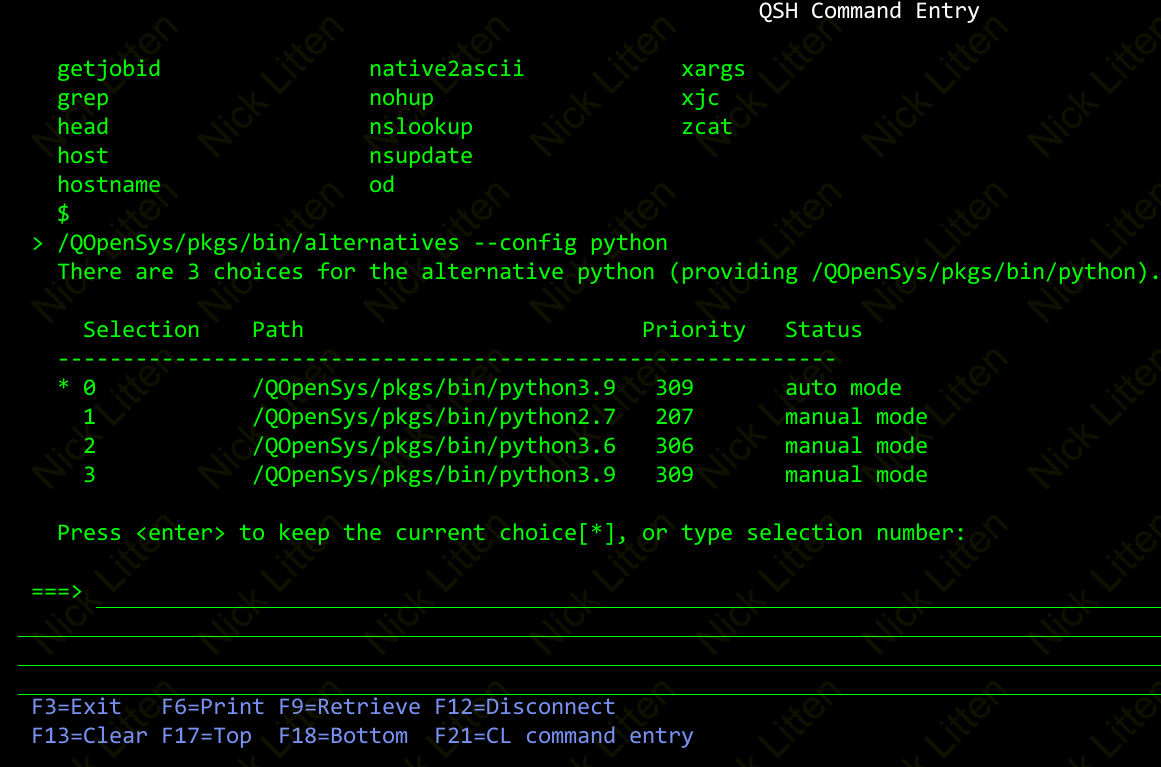
Pick Your Python
IBM i lets you run multiple Python versions (like a snake pit, but friendlier).
Set 3.13 as default:
/QOpenSys/pkgs/bin/alternatives --config pythonChoose /QOpenSys/pkgs/bin/python3.13.
Grab IBM i Goodies
For DB2 access
yum install python313-ibm_dbFor RPG/CL integration
/QOpenSys/pkgs/bin/pip3.13 install itoolkitMake Sure It Hisses
Run python3.13 –version to confirm it’s alive and well.
Python 3.13 in Action on IBM i: Let’s Have Some Fun
Now that Python 3.13 is on your IBM i system, here’s how to put it to work (and have a laugh while you’re at it):
- Automate Like a Pro: Write a script to automate backups or job scheduling, and use the new REPL to debug it while enjoying those colorful tracebacks. It’s like Python is saying, “Oops, you broke me but look how pretty I am!”
- Modernize with Swagger: Build a REST API with FastAPI to expose IBM i data to the web. The free-threaded mode (once it’s stable) might let your API handle requests faster than you can say “RPG who?”
- Crunch Data with a Smile: Use pandas (yum install python313-pandas) to analyze DB2 data. The math.fma() function ensures your financial reports are spot-on, so you don’t accidentally tell the CFO they’re broke.
- Bridge the Old and New: Use itoolkit to call RPG programs, and let Python 3.13’s friendly error messages guide you when things go wrong. It’s like having a buddy who says, “Hey, you forgot a parameter, let’s fix that!”
Should You Let Python 3.13 Loose on IBM i?
If Python 3.13 is available, it’s a no-brainer to upgrade:
- Security: Python 3.9 is officially retired, so 3.13 keeps you safe with updates until October 2029.
- Speed (Eventually): The JIT and free-threaded mode are like Python’s New Year’s resolution to get fit, promising, but not quite there yet.
- Fun Factor: The new REPL and error messages make coding on IBM i feel less like a chore and more like a comedy show.
But watch out:
- Compatibility: Check if ibm_db or other IBM i packages play nice with 3.13. If not, you might need to wait for updates.
- Experimental Features: The JIT and free-threading are more “cool science project” than “production-ready.” Don’t bet your job on them just yet.
Wrapping Up: Python 3.13 and IBM i – A Match Made in Tech Heaven
Python 3.13 on IBM i is like inviting a witty, modern snake to a party full of dependable old servers, it brings fresh energy, a few laughs, and a lot of potential. Whether you’re automating tasks, building APIs, or analyzing data, this version has something to offer, even if some features are still figuring out how to dance. So, fire up your IBM i system, install Python 3.13, and let’s see what kind of coding mischief we can get into. Have you tried 3.13 on IBM i yet?
Drop a comment – I’d love to hear your stories (or your best Python puns)!
