
Section 1: Overview of Node.js on IBM i
IBM-i is a flexible operating system
IBM i is far more than an RPG platform. While RPGLE remains the most widely used business language on the system, IBM i also supports COBOL, CL (Control Language), C, C++, Java, SQL, PHP, Python, Node.js, JavaScript, and open-source languages such as Perl and Ruby. Many modern applications combine several of these languages, with RPGLE handling business rules and database processing, SQL managing data access, and Node.js or Python providing web services, APIs, automation, and integration with cloud applications. Because they all run on the same IBM i platform and can access the integrated Db2 for i database, developers can choose the best language for each task rather than forcing every solution into a single programming model. This flexibility allows IBM i organisations to continue leveraging decades of proven RPG and COBOL code while embracing modern application development techniques using today's most popular open-source languages.
But, we are hear to talk about Node.js so let's draw the picture before we start pouring concrete.
The layers
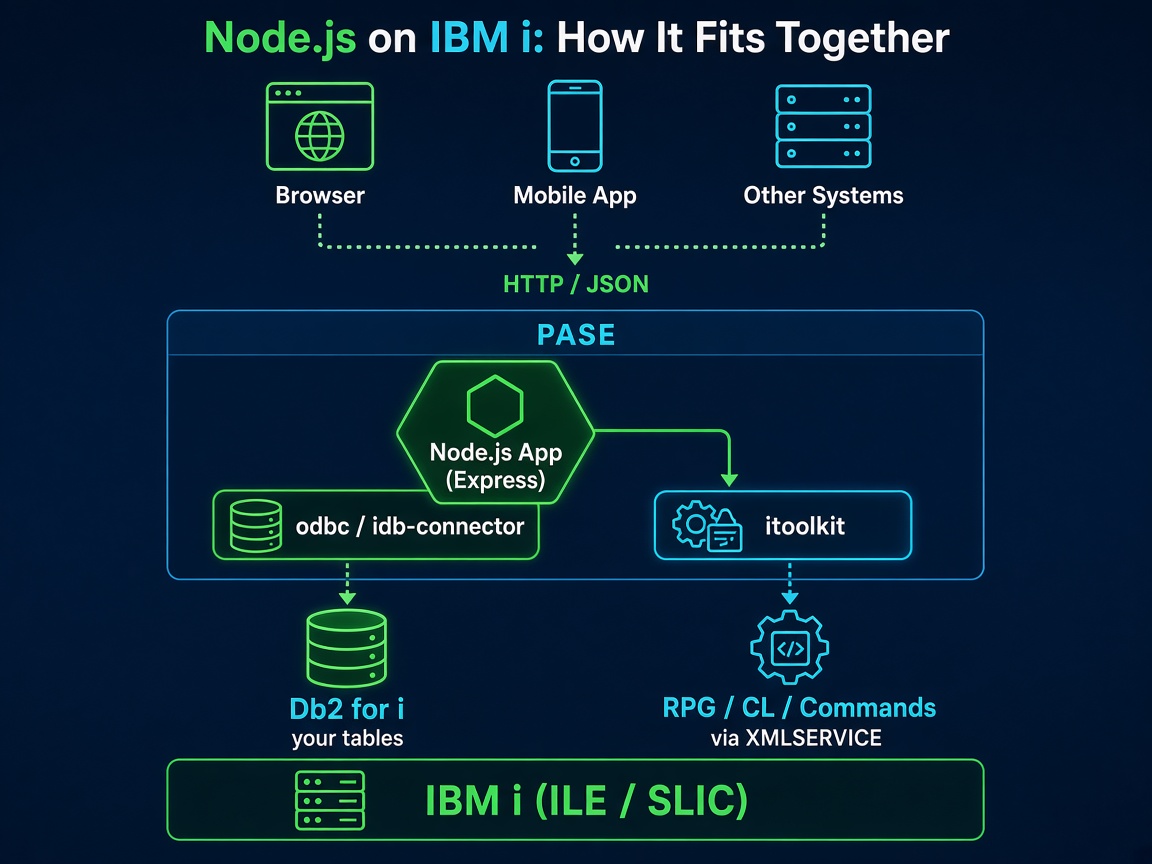
Key IBM i open source components
| Component | What it is | How you get it |
|---|---|---|
nodejs20 (or nodejs22) | The Node.js runtime | yum install nodejs20 |
npm | Node package manager | Comes with Node.js |
unixODBC, ibm-iaccess | ODBC driver manager + IBM i Access ODBC driver | yum install unixODBC ibm-iaccess |
odbc (npm) | Node.js ODBC package | npm install odbc |
idb-connector / idb-pconnector (npm) | IBM's native Db2 for i connector (IBM i only) | npm install idb-pconnector |
itoolkit (npm) | Call programs/commands via XMLSERVICE | npm install itoolkit |
Note on Node.js Versions: Software evolves quickly, so version numbers naturally change over time. In the examples throughout this guide, I’ll be using Node.js 20 (LTS). However, you can install any modern version you prefer.
As a general rule, I recommend installing the most recent LTS (Long-Term Support) version for production environments. LTS releases are supported for 30 months, receiving critical bug fixes, security updates, and performance improvements, which ensures a stable and predictable environment for your applications.
Need to manage multiple versions? Consider using a version manager like nvm (Node Version Manager) for Linux/macOS or nvm-windows / fnm (Fast Node Manager). This allows you to easily switch between Node.js versions per project without breaking system-wide dependencies.
Checking your installed version: You can verify your current Node.js version at any time by running node -v in your terminal.
ODBC or idb-connector?
Both work. In this course I'm going with the odbc package because:
- It's the direction IBM's open source team recommends for new development.
- The same code runs on the IBM i and from your laptop (with the IBM i Access ODBC driver installed), which makes development much nicer.
idb-pconnector is a perfectly good choice if you only ever run on-box. I'll show a quick example of it in Section 3 so you've seen both.
Where your code lives
Your Node.js source lives in the IFS - for example /home/NICK/ingredients-app. Edit it with IBM BOB, or VS Code (Code for IBM i extension) over SSH, or edit locally and push with git. No SEU required. Sorry, SEU fans. (Is there anyone left still fighting the SEU corner?)