
Mapepire is only one of the channels BOB uses. When you ask BOB to "explain program ORDPROC and add a delivery-date field", it reads source, looks up table definitions, runs CL, compiles, reads compile errors, and maybe pokes around the IFS. That's a lot of different conversations with your IBM i.
So in this lesson we step back, put the kettle on, and look at the whole route map: where BOB runs, how it gets onto your system, which channel each kind of action travels down, and how you can watch every single one of them happen.
By the end of this lesson you'll know:
- Where BOB runs, and where your IBM i fits in
- What happens when Code for IBM i connects (and what it leaves behind on your system)
- Which route each kind of action takes: SQL, CL, PASE, source, IFS, compiles
- What BOB's IBM i tools are, and how approvals keep you in charge
- When the optional MCP route makes sense
- How to watch BOB's traffic yourself, from both ends
Heads up: IBM documents BOB's tools and settings well, but it doesn't document every internal hop. Where I've worked something out by reading the open-source Code for IBM i code or by reasoning, I say so. Anything marked [CHECK] is worth a sanity check on your own system.
1. Where everything lives
Let's start with geography, because it explains everything else.
BOB runs on your PC. IBM Bob is a VS Code-based IDE. IBM's prerequisites list Windows x64 and macOS on Apple Silicon as the supported platforms (Linux, Windows ARM64 and Intel Macs may work but aren't supported). The AI behind it is served from IBM's cloud by default, and since 30 September 2026 IBM also lets you self-host BOB on Red Hat OpenShift, including air-gapped setups.
Your IBM i stays exactly where it is. Nothing about BOB gets installed into your IBM i's operating system. BOB reaches it remotely.
The Premium Package for i is the bridge. It's an extension for BOB that adds the IBM i modes, tools, skills and workflows. When you first install it, it automatically installs these open-source IBM i extensions:
| Extension | ID | Minimum version | What it does for BOB |
|---|---|---|---|
| Code for IBM i | halcyontechltd.code-for-ibmi | 3.0.10 | The connection itself: SSH, commands, source, IFS, actions |
| Db2 for IBM i | halcyontechltd.vscode-db2i | 2.0.1 | SQL job manager and SQL examples |
| RPGLE | halcyontechltd.vscode-rpgle | 0.33.7 | RPG language support |
| CLLE | IBM.vscode-clle | 1.2.6 | CL language support |
| IBM i Testing | IBM.vscode-ibmi-testing | 1.3.4 | RPGUnit test runs |
| IBMi Languages | barrettotte.ibmi-languages | 0.6.25 | Syntax highlighting |
And here's the sentence from IBM's security guidelines that sums up this whole lesson:
"IBM Bob Premium Package for i strictly uses Code for IBM i to communicate with the IBM i over SSH."
One door. Everything else is about what happens once you're through it.
2. Through the door: the SSH connection
What you need on the IBM i
From IBM's Bob prerequisites:
- IBM i 7.4 or higher, with a recent Db2 PTF group (on 7.4, SF99704 level 13 or higher)
- The SSH daemon running:
STRTCPSVR SERVER(*SSHD), from licensed program 5733-SC1, with user QSSHD enabled - If your
sshd_configusesAllowUsers,DenyUsers,AllowGroupsorDenyGroups, your profile must be explicitly allowed
Who you are
You connect as your own IBM i user profile, with a password or an SSH private key (Code for IBM i accepts OpenSSH, RFC4716 and PPK key formats). IBM's guidelines say Code for IBM i supports, and IBM recommends, multi-factor authentication where applicable.
From that moment, BOB is you. IBM puts it bluntly: "any operation the user profile is permitted to perform on the IBM i, Bob will also be able to perform." Hold that thought for section 7.
What happens when you click Connect
You can watch this in the connection progress messages, and I've checked it against the Code for IBM i 3.0.13 source (the version BOB currently pulls from Open VSX). In order, roughly:
- Connecting via SSH, plus a prompt for an extra factor if you use MFA.
- Checking your home directory is there and writable. No usable home directory, no party.
- Checking installed components: what's in
/QOpenSys/pkgs/bin(bash,attr,iconvand friends) and which Java versions are installed. - Checking the OS version.
- Starting Mapepire. This is the one component Code for IBM i deploys itself. It uploads
mapepire-server-X.Y.Z.jarto~/.vscode/and starts it over SSH in single mode (all the gory detail is in the Mapepire lesson). From here on, Code for IBM i has a SQL job for its own use. - Fetching conversion values (CCSIDs). It reads the
QCCSIDsystem value and your user profile's CCSID. If your job CCSID is 65535 (*HEX), it uses the job'sDEFAULT_CCSIDinstead. The values are written to the output channel, so you can see exactly what it picked. - Checking the library list. It reads your job's user library list and current library, then applies the library list you've configured in Code for IBM i's User Library List view.
- Checking the temporary library and temporary IFS directory. By default those are the library
ILEDITOR(shared with other users) and~/.vscode/tmp. It creates the library if it's missing and clears out old temporary objects. - Housekeeping checks: for example, whether the
QCPTOIMPForQCPFRMIMPFdata areas exist (they break copy commands), whether bash is your default shell, and whether/QOpenSys/pkgs/binis on yourPATH(it is, isn't it? We sorted that in the Node.js course).
CCSID note: Most "BOB mangled my # and @ signs" moments are CCSID moments. Code for IBM i converts source between your source file CCSID and UTF-8 on the way in and out, so get your user profile CCSID right (not 65535) and the rest tends to behave. On 7.3 and below it also checks the PASE variablesPASE_LANGandQIBM_PASE_CCSID, but BOB needs 7.4 or later anyway.
What BOB is told about the connection
This is the clever bit. IBM's docs say that in IBM i Developer mode, BOB injects details of your connection into every task:
- Connection name, host, user profile and IFS working directory
- OS version and CCSID settings
- Current library and full user library list
- Temporary library and IFS directory
- Project rules from an
AGENTS.md, if you have one ({currentLibrary}/QBOBSRC/AGENTS.MDin QSYS, or{ifsWorkingDirectory}/.bob/AGENTS.mdin the IFS)
IBM i Database mode adds the active SQL job's details from Db2 for IBM i's SQL Job Manager: job name, naming, current schema, library list and isolation level. That's why BOB knows to write FOODLIB/INGREDIENTS in one shop and FOODLIB.INGREDIENTS in another without being told.
3. The route map: which channel does what?
Once connected, Code for IBM i has two pipes into your IBM i, both riding the same SSH connection:
- The SSH shell channel, for PASE commands and file transfers (SFTP)
- The Mapepire SQL job, for SQL, and (in current versions) for ILE CL commands too
Here's how each kind of action travels. The middle column is documented by IBM or visible in the Code for IBM i source. The right-hand column tells you which BOB tool triggers it.
| BOB wants to... | How it travels | BOB tool |
|---|---|---|
| Run SQL | Through the Mapepire SQL job. Results are capped at 100 rows by default (more on that below). | execute_sql_statement, get_table_columns, get_file_info, get_schema_info |
| Run a CL command | Code for IBM i's ILE route. In 3.0.13 it sends the command to the Mapepire SQL job as a CL request, after a CHGLIBL (and CHGCURDIR if needed), then reads the new messages from QSYS2.JOBLOG_INFO. In the output channel it appears as "Running CL through SQL". | execute_cl_command |
| Run a PASE command | Straight down the SSH shell channel, in your home directory (or a working directory). | execute_pase_command |
| Read a source member | A CL copy (CPYTOSTMF, sometimes via a QTEMP copy first) into a temporary stream file, converting from the source file CCSID, then download over SFTP. | read_member, search_qsys |
| Write a source member | The reverse: upload over SFTP to a temporary stream file, then CPYFRMSTMF into the member. | write_member |
| Read or write an IFS file | SFTP directly. If the file isn't UTF-8 and automatic IFS CCSID conversion is switched on in the connection settings, it's converted with iconv via a temporary copy. | read_stream_file, write_stream_file, search_ifs |
| Browse libraries, objects, members | SQL catalog services such as QSYS2.OBJECT_STATISTICS and QSYS2.PARTITION_STATISTICS. | search_qsys |
| Change the library list | Updates the connection profile and job library list, and keeps Code for IBM i's User Library List view in sync. | manage_library_list |
| Compile | A Code for IBM i action (for example CRTBNDRPG ... OPTION(*EVENTF)) run as a CL command. Afterwards Code for IBM i reads the EVFEVENT file from the object's library with SQL and shows the errors as diagnostics. | get_compile_actions, execute_compile_action |
| Run unit tests | IBM i Testing extension plus RPGUnit on the IBM i, with optional *LINE or *PROC coverage. | run_rpg_unit_test_suite, generate_rpg_unit_test_stub |
| Look up documentation | fetch_cl_command_doc runs GENCMDDOC on your IBM i. search_ibm_i_docs_with_rag searches IBM's indexed IBM i documentation and Redbooks, not your system. | Documentation tools |
| Answer "what calls what?" | The Understand component's scan data, stored in a Db2 library you choose, read through its own dedicated SQL jobs. | understand_* tools |
A few notes on that table:
- The CL route has changed recently. The Code for IBM i development branch (3.0.14-dev, November 2026) runs ILE commands through a new
runCLmethod using Mapepire'scl/rcclrequests. Either way, CL goes through Mapepire, not through QSH. QSH (/QOpenSys/usr/bin/qsh) is only used when an action is explicitly set to theqshenvironment, and then it runsliblistcommands first to set up the library list. - Compiles need
*EVENTF. IBM's docs sayexecute_cl_command"automatically suggests including parameters to generate event files when compiling source code." If an action has no*EVENTF, Code for IBM i tells you it isn't fetching errors. No EVFEVENT, no clickable errors, and BOB has a lot less to go on when fixing them. - Spooled output gets captured. When an action asks for spooled files, Code for IBM i overrides
*PRTFtoHOLD(*YES)with its own user data, reads the result withSYSTOOLS.SPOOLED_FILE_DATA, and then deletes those spooled files (unless you've told it to keep them). - The "how it travels" column is Code for IBM i's behaviour. IBM doesn't publish which Code for IBM i API each BOB tool calls. The tool names line up neatly with these routes, and the BOB output channel logs every tool call next to Code for IBM i's own log, so you can check this for yourself in section 6. [CHECK]
What about the stuff that isn't your IBM i?
Two channels don't touch your system at all:
- The model itself. Your prompt, plus whatever BOB has read (source, query results, job logs), goes to the AI model to be reasoned over. That's IBM's cloud by default, or your own OpenShift cluster if you self-host. That's my plain reading of how any AI assistant works rather than an IBM statement about BOB's data flow, but it's why the very first question every auditor asks is "where does our source code go?"
- RAG documentation search, which queries IBM's indexed IBM i docs rather than your box.
4. BOB's IBM i tools, and how it chooses them
IBM's general tools page describes the loop clearly. For every step, BOB will:
- Select the appropriate tool based on your request
- Present the tool with its parameters for your review
- Run the approved tool and show you the results
- Continue until the task is complete
The Premium Package for i adds these IBM i tool groups (from IBM's Tools page):
| Group | Tools | Approval group |
|---|---|---|
| Read | read_member, search_qsys, read_stream_file, search_ifs | Read |
| Edit | write_member, write_stream_file, generate_dds | Write/Edit |
| Execute | execute_cl_command, execute_sql_statement, execute_pase_command, manage_library_list, convert_rpg_source | Execute |
| Build | get_compile_actions, execute_compile_action | Execute |
| Test | generate_rpg_unit_test_stub, run_rpg_unit_test_suite | Read and Execute |
| SQL | get_schema_info, get_file_info, get_table_columns, get_cl_command_library | Execute |
| Documentation | search_ibm_i_docs_with_rag, fetch_cl_command_doc, search_sql_examples, fetch_sql_example | Documentation |
| Understand | understand_list_apps, understand_app_summary, understand_find_objects, understand_describe_object, understand_trace_dependencies, understand_find_symbol | Understand (only if installed) |
Note the "Available in" detail on IBM's page: most of the tools that change things (write_member, execute_cl_command, execute_pase_command, the build tools) are IBM i Developer mode only. IBM i Database mode gets the read tools for QSYS, the SQL tools and execute_sql_statement, but it can't run CL or PASE.
How does BOB decide?
From IBM's docs, a few hard-wired habits:
-
get_table_columnscomes first. BOB calls it "before running SQL against a table or view whose columns are not already known in the conversation." So no guessing column names. I wish I could say the same for some of my old colleagues. - Understand comes first for structural questions. If Understand is installed and the application has been scanned, BOB uses the Understand tools "as its first source of information" for "what calls what" questions, and doesn't read source members unless you ask it to.
- RAG when it's stuck. BOB tends to search the IBM docs for conceptual questions, or when it finds itself going round in circles (for example, failing to fix a compile error).
The workspace shapes where it looks
BOB has three workspaces: Local (a folder on your PC, such as a Git clone), Library List (Code for IBM i's User Library List) and IFS Working Directory (default /home/<user>). The workspace tells BOB where to focus. It doesn't fence it in: IBM says BOB can still reach QSYS, the IFS, CL, SQL and PASE from any workspace "if explicitly told to do so."
5. The optional fourth route: the IBM i MCP Server
Everything so far happens through Code for IBM i. There's one more option: IBM's open-source IBM i MCP Server (IBM/ibmi-mcp-server). It exposes YAML-defined SQL tools to any MCP-capable AI client, and IBM's Agentic AI on IBM i guide lists "IBM Bob + IBM i MCP Server" as a deployment option. BOB's modes include mcp tool access (IBM i Developer mode does, for one), and MCP tool calls have their own approval group.
When would you use it? My take:
- You want BOB (and other agents) to use a curated set of SQL tools your team has written and trusts, rather than free-form SQL
- You want a read-only, narrowly scoped route for system health and monitoring questions
- You're building agents outside BOB (watsonx Orchestrate, LangChain and so on) and want one set of tools for all of them
For everyday development (source, compiles, CL) the built-in Code for IBM i route does the job. The MCP route uses Mapepire's server mode on port 8076, which we covered in the Mapepire lesson.
6. One request, end to end
Let's follow a real request through every layer: "Explain program ORDPROC in ORDLIB, then make it show the DLVDATE column from the ORDHDR file and recompile." BOB is in IBM i Developer mode, the workspace is the Library List, and Read is the only group on auto-approve.
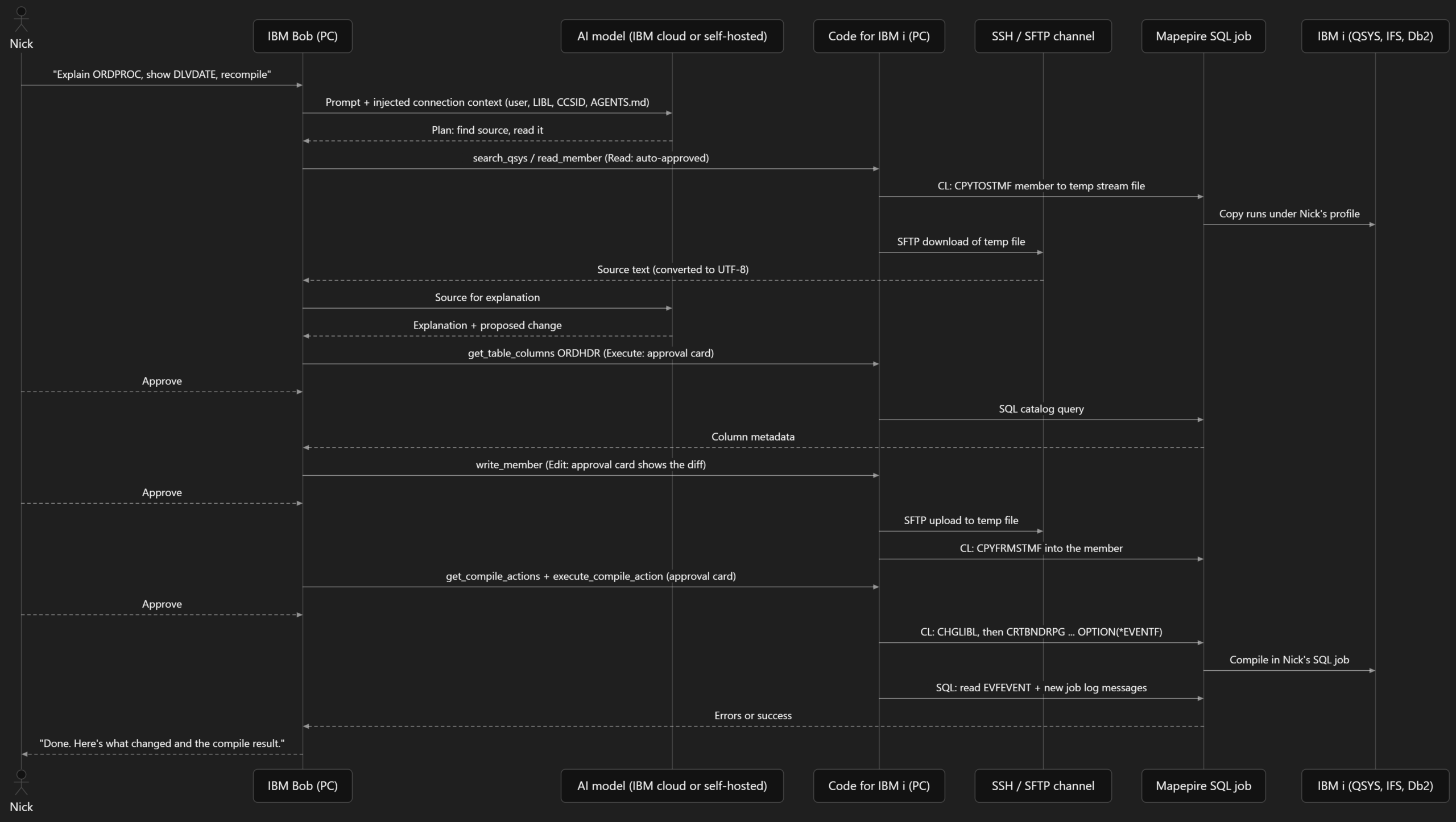
The exact tools BOB picks will vary from run to run (it's an AI, not a CL program), but the routes stay the same.
7. Hands-on: watch it happen
Theory's lovely, but I trust what I can see. Let's watch BOB's traffic from both ends.
7.1 On your PC: the Output panel
In BOB, open View → Output (Ctrl+Shift+U on Windows, Cmd+Shift+U on Mac), then use the dropdown in the top-right corner of the panel:
| Channel | What you'll see |
|---|---|
| IBM Bob Premium Package for i | Every IBM i tool call: an INFO line when it starts (tool name and parameters), ERROR if it fails, WARN if it's still running after 30 seconds, and a completion line with the duration in milliseconds |
| Code for IBM i | Every CL, SQL and PASE command it runs on your behalf, with results. Look for Running CL through SQL: and Running SQL query: lines, plus PASE commands with their working directory and JSON results |
| IBM Bob | General extension logging. Search for [source:ibmi] to filter the IBM i entries |
| IBM i Testing | Test discovery, configuration and output |
Now try it. Ask BOB in IBM i Developer mode: "How many members are in QRPGLESRC in my current library?" Then watch the two channels side by side. You'll see the BOB tool call, and underneath it the actual SQL Code for IBM i sent. Oddly satisfying, like watching a dishwasher through a glass door.
7.2 On the IBM i: find BOB's jobs
Every connection shows up as real jobs on your IBM i, running under your profile. From a 5250 session, WRKACTJOB filtered on your user is the quick way. Or SQL, which is more in the spirit of things. Run these from ACS Run SQL Scripts or a green screen STRSQL (not from inside BOB, or you'll be watching it watch itself):
SELECT JOB_NAME, SUBSYSTEM, JOB_TYPE, FUNCTION_TYPE, FUNCTION,
JOB_STATUS, CLIENT_APPLNAME
FROM TABLE(QSYS2.ACTIVE_JOB_INFO(
CURRENT_USER_LIST_FILTER => 'NICK',
DETAILED_INFO => 'ALL'))
ORDER BY SUBSYSTEM, JOB_NAME;
Change NICK to your own profile. What to look for:
-
CLIENT_APPLNAME: IBM's security guidelines say the Premium Package sets theCLIENT_APPLNAMEspecial register on the SQL jobs it uses, to something like1.109.5+IBM.bob-code 2.0.0 | code-for-ibmi 3.0.10. That's your audit hook for BOB's activity. - SSH and PASE jobs: your SSH session and the processes it starts (including the Mapepire JVM) run as jobs under your profile, typically in QUSRWRK. [CHECK] the exact job names and subsystem on your system.
- The database work itself may show up in a separate server job (for example a
QSQSRVRjob in QSYSWRK, which native JDBC uses) rather than in the JVM's own job. That's why we filter on current user rather than job name. [CHECK]
Now the network side. Which jobs own your SSH connections?
SELECT JOB_NAME, AUTHORIZATION_NAME, REMOTE_ADDRESS, REMOTE_PORT, LOCAL_PORT
FROM QSYS2.NETSTAT_JOB_INFO
WHERE LOCAL_PORT = 22
ORDER BY REMOTE_ADDRESS;
You'll see a row per SSH connection, with your PC's IP address in REMOTE_ADDRESS. Disconnect in BOB, run it again, and watch your row disappear. And there's no port 8076 row unless you've switched to Mapepire server mode.
Authority note: you can always see your own jobs. Seeing other people's job details inACTIVE_JOB_INFOgenerally needs*JOBCTLspecial authority, so if you're the admin auditing the whole team, run these under a suitably authorised profile.
8. Security: keeping a human in the loop
Because every channel runs as your profile, BOB's power on your IBM i is exactly your power. Here's the checklist I give clients.
1. Least-privilege profile. IBM's own words: "ensure the user profile used has the least privileges necessary." Develop with a normal developer profile on a development partition. No *ALLOBJ, no QSECOFR, and absolutely not on the box that runs payroll.
2. Understand the approval controls. IBM documents four:
| Control | Where | Scope |
|---|---|---|
| Tool-group auto-approval (Read, Edit, Execute, MCP, Skill, Todo, Subtask, Subagent, Mode, plus the IBM i Documentation and Understand groups) | Permissions button beside the Mode selector, or Settings → Tool Auto-approval for defaults | Per task |
| Allowed and Denied Commands | Settings → Execute | Global, for terminal commands |
| MCP Always Allow | Approval card or MCP server settings | Task or global |
| One-time approval | The Approve button on an approval card | One call |
IBM's quickstart recommends starting with only Read auto-approved, and IBM rates Edit and Execute as high risk. I agree. For IBM i, Execute covers CL, SQL and PASE, so think of it as handing over a command line.
3. Use the IBM i guardrails (Settings → Extensions → IBM Bob Premium Package for i):
-
vscode-ibmi-bob.guardrails.enforceQualifiedCLCommands(default true): CL commands must be library-qualified (QSYS/CRTBNDRPG, notCRTBNDRPG). If BOB tries an unqualified command, it gets an error listing the qualified options fromQSYS2.COMMAND_INFO, and tries again. That stops a sneaky copy of a command earlier in the library list from getting run. Leave it on. vscode-ibmi-bob.guardrails.deniedSQLStatementTypes: these statement types always need your approval, even with Execute auto-approved. The default list isALLOCATE, CALL, COMMIT, CONNECT, DISCONNECT, DROP, EXECUTE, GRANT, LOCK, MERGE, PREPARE, RENAME, REVOKE, ROLLBACK, SAVEPOINT, TRUNCATE, UPDATE. Trim it only if you really must.vscode-ibmi-bob.general.maxRowsToFetch(default 100): not a security setting as such, but it limits how much of your data lands in the conversation in one go.
4. Lock down the shared bits. IBM's guidelines call these out specifically:
- The default temporary library
ILEDITORis shared. Give yourself a private temp library and exclude other users. - If you change the temporary IFS directory from
~/.vscode/tmp, make sure only you can access it. - System-wide Code for IBM i settings live under
/etc/vscode/in the IFS. Make sure only the right people can edit them. - The Understand library holds scan data about objects some users may not be authorised to see. Restrict it, and audit it from the Understand Dashboard's Access Control tab.
- RPGUnit installs into
RPGUNITwith public*CHANGEby default. Tighten that.
5. Keep the extensions current. IBM recommends turning on Auto Update for the prerequisite extensions. (See the troubleshooting table for why that matters right now.)
6. Audit. CLIENT_APPLNAME tells you which SQL jobs were BOB's. Combine that with your normal QAUDJRN auditing and you can answer "what did the robot do?" when someone inevitably asks.
7. Read the approval card. Every time. It's the cheapest code review you'll ever get.
9. Troubleshooting
| Symptom | Likely cause and fix |
|---|---|
| Can't connect at all | Is SSHD running? STRTCPSVR SERVER(*SSHD), and check QSSHD is enabled. Check AllowUsers/DenyUsers in sshd_config. Check port 22 is open between your PC and the IBM i. |
| "Failed to start Mapepire SQL job" | In November 2026, Code for IBM i 3.0.13 uploaded one Mapepire jar version and checked for another. Install Code for IBM i 3.0.14 manually from its VSIX (BOB uses Open VSX, which still had 3.0.13). Details in the Mapepire lesson. |
| Connected, but SQL and CL fail | Mapepire isn't starting. Check Java is installed and pick a valid Mapepire Java runtime in the connection settings. |
| "Home directory" errors on connect | Your profile's home directory doesn't exist or isn't writable. Create /home/YOURUSER and make sure you own it. |
#, @ or $ turn into rubbish | A CCSID problem. Check your user profile CCSID isn't 65535, and look at the CCSID information lines in the Code for IBM i output channel. |
| Copy to or from a member fails oddly | Look for the QCPTOIMPF / QCPFRMIMPF data areas that Code for IBM i warns about on connect, and delete them if your shop doesn't need them. |
| BOB compiles against the wrong objects | Library list. Check Code for IBM i's User Library List view and current library, or ask BOB to use manage_library_list to show you what it's using. |
| Compile fails but there are no clickable errors | The action is missing OPTION(*EVENTF), so there's no EVFEVENT to read. Fix the action. |
| BOB keeps erroring on CL commands | The qualified-command guardrail. That's by design: let it retry with QSYS/..., or qualify the command in your prompt. |
| BOB asks for approval on an UPDATE despite auto-approve | That's deniedSQLStatementTypes doing its job. |
| BOB hangs on a tool | Check the IBM Bob Premium Package for i channel for a WARN after 30 seconds, then the Code for IBM i channel for the command it's waiting on. A CL command waiting for a reply message is a classic. |
Key takeaways
- BOB runs on your PC, with the AI served from IBM's cloud or your own OpenShift. Your IBM i doesn't need anything BOB-specific installed in the OS.
- Everything goes through Code for IBM i over SSH. That's one door, as your own user profile, with password, key and MFA options.
- On connect, Code for IBM i checks your home directory, Java, CCSIDs, library list, temp library (
ILEDITOR) and temp directory (~/.vscode/tmp), and starts Mapepire. - SQL and CL go through the Mapepire SQL job. PASE goes down the SSH shell. Source and IFS files move by CL copy commands plus SFTP. Compiles are Code for IBM i actions, with errors read from EVFEVENT.
- BOB's IBM i tools fall into Read, Edit, Execute, Build, Test, SQL, Documentation and Understand groups, and approval cards keep you in charge. Start with Read-only auto-approve and keep the guardrails on.
- Watch it all in the Output panel, and on the IBM i with
ACTIVE_JOB_INFO(look atCLIENT_APPLNAME) andNETSTAT_JOB_INFO.
Quick quiz
- According to IBM, what is the only way the Premium Package for i communicates with your IBM i?
- Which IBM i user profile does BOB act as?
- In Code for IBM i 3.0.13, how does an ILE CL command such as
CRTBNDRPGreach the IBM i? - How does BOB read the contents of a source member?
- Which compile option makes clickable compile errors possible, and which file does Code for IBM i read?
- You've auto-approved Execute, but BOB still asks before running an
UPDATE. Why? - Which column in
QSYS2.ACTIVE_JOB_INFOhelps you spot BOB's SQL jobs?
Answers
- Through Code for IBM i, over SSH.
- Your own: the user profile of the active Code for IBM i connection. Anything you can do, BOB can do.
- It's sent to the Mapepire SQL job as a CL request (shown as "Running CL through SQL" in the output channel), after a
CHGLIBLto set the library list. The new messages are then read fromQSYS2.JOBLOG_INFO. - Code for IBM i copies it to a temporary stream file with
CPYTOSTMF, converting the CCSID, then downloads it over SFTP. OPTION(*EVENTF), and Code for IBM i reads theEVFEVENTfile in the object's library.UPDATEis invscode-ibmi-bob.guardrails.deniedSQLStatementTypes, so it always needs explicit approval.CLIENT_APPLNAME(withDETAILED_INFO => 'ALL'). BOB sets it to identify the extension and its dependencies.
Next steps
Now you know the routes, in the next lessons we can puts them to work: we'll write an AGENTS.md in QBOBSRC that teaches BOB your shop's coding standards, set sensible auto-approve defaults for the team, and give BOB its own private temp library. Before then, do the section 7 exercise at least once. Watching your own IBM i answer BOB's questions takes a lot of the mystery (and a bit of the fear) out of AI on IBM i.
Right, that's enough plumbing for one day. Kettle's boiled.